Guide
Podcast transcripts on iPhone
A transcript turns a linear audio file into searchable text: you read along, tap to jump to the right moment, and find that one quote again weeks later. This guide covers the three routes to a transcript and where each one stops.
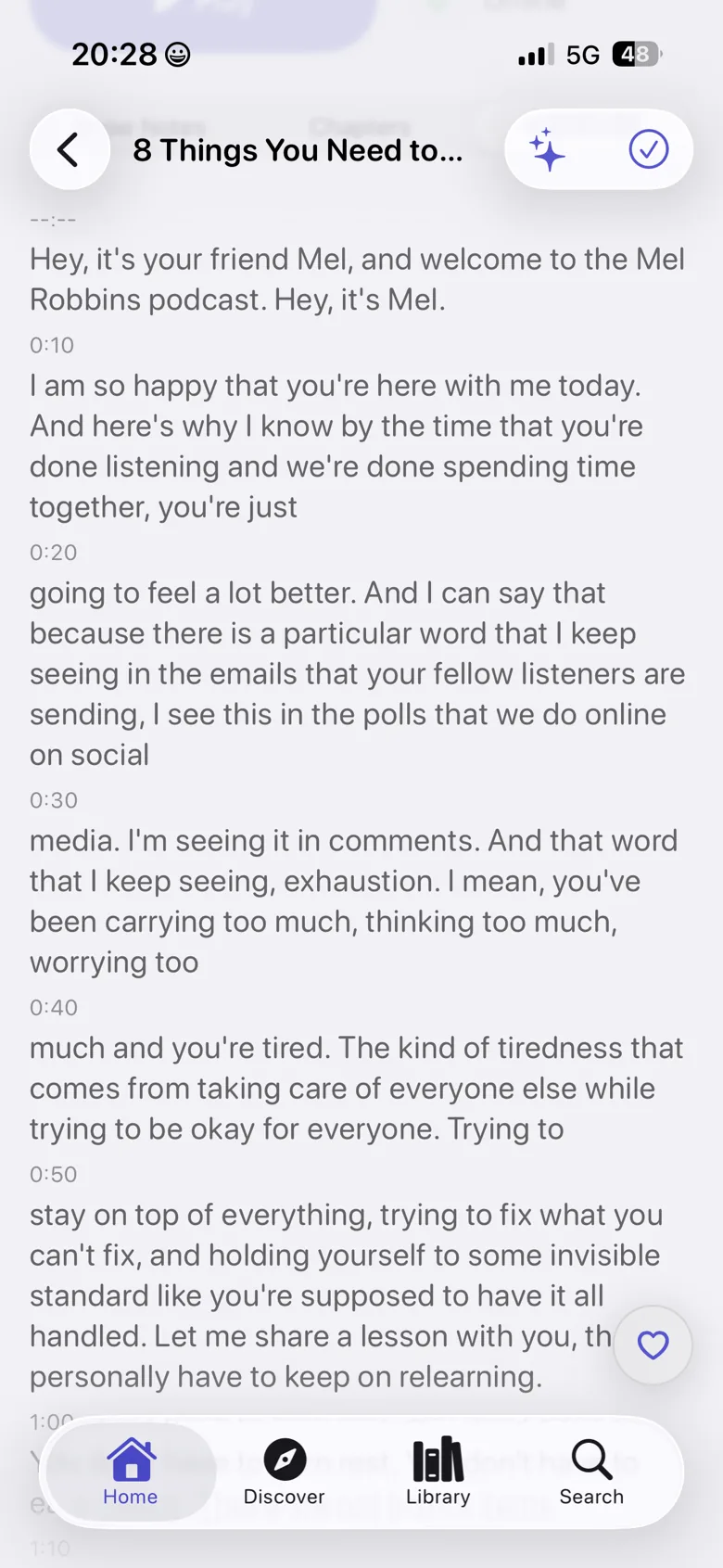
Why transcripts change how you listen
Audio is linear. Looking for a specific statement means scrubbing and guessing. A transcript removes that constraint and unlocks several things at once:
- You read along while you listen, which helps with technical terms, names, numbers and strong accents.
- Instead of scrubbing you tap a sentence and playback moves to exactly that point.
- Full-text search covers your whole library, so you don't have to remember episode numbers.
- For people who are deaf or hard of hearing, podcasts become usable at all.
- When learning a language you listen and read at the same time, at a speed you control.
Three routes to a transcript
Technically there are three fundamentally different sources. They differ in coverage, cost and, most importantly, in where your audio ends up.
| Route | Coverage | Where does processing happen? |
|---|---|---|
| Publisher transcript from the RSS feed | Only shows that ship one, still a minority | Nowhere: the text is already in the feed |
| Cloud transcription service | Every episode the service knows about | On someone else's servers, where the episode is uploaded or fetched |
| On-device transcription | Any episode you can download | On your iPhone, the audio file never leaves the device |
The first route is the best one when it's available: a transcript produced by the show itself is usually proof-read and marks speaker changes. But most feeds still don't include one. For everything else it comes down to route two or three. That's where you decide whether your listening habits become data on someone else's server.
What Podknow shows for free
If the RSS feed contains a publisher transcript, Podknow displays it in full, with no Premium required and nothing to process. On-device transcription only kicks in when an episode doesn't ship one.
How to create a transcript in Podknow
- Download the episode. Transcription works on the local audio file, so the download comes first.
- Open the transcript. Go to the episode view and open the transcript area. A publisher transcript appears immediately.
- Start on-device transcription. If there is none, Podknow generates the text on your iPhone. It takes compute time but needs no internet connection.
- Read along and jump. The current sentence is highlighted; tapping any line moves playback there.
- Search it. From now on the episode is part of full-text search across your whole library.
Why on-device processing matters
With a cloud service, the content you listen to leaves your device. That matters less for public podcasts than for private recordings, but it still creates a record of exactly what you listen to, when, and what you search for inside it. That record is the most revealing part of your listening habits.
Podknow uses Apple Intelligence directly on the iPhone instead. There is no Podknow server that could hold episodes, transcripts or your questions, because there is no Podknow server at all. That isn't a setting you toggle; it's the architecture of the app.
From transcript to knowledge
A transcript is the foundation, not the goal. Once the text exists, more can be derived from it on the device:
Summary
The core points of a 90-minute episode in a few paragraphs, as a preview before listening or a memory aid afterwards.
Automatic chapters
Long conversations get split into sections, even when the show sets no chapter marks of its own.
Questions about the episode
The knowledge assistant answers from the transcript, and every answer links to the moment in the audio where it was said.
Full-text search
Search transcripts, titles, descriptions, people and chapters across your entire library.
Limits worth knowing
Honesty matters here: automatic transcription is not error-free. Proper nouns, jargon and heavily overlapping speakers produce mistakes, with every provider, in the cloud as much as on-device. Poor recording quality noticeably reduces accuracy. And transcribing on the iPhone costs compute time and battery; it's faster than real time, but not instant. For a word-perfect quote, it's always worth jumping to the linked moment in the audio and listening.
Frequently asked
Podcast transcripts on iPhone
Do I need an internet connection to transcribe?
No. Transcription runs through Apple Intelligence on your iPhone. Once the episode is downloaded it works in airplane mode.
Does it work for podcasts without a transcript?
Yes, that's exactly what on-device transcription is for. Podknow generates the text itself when the RSS feed doesn't provide one.
Which languages can be transcribed?
Transcription uses Apple Intelligence's on-device speech recognition, so coverage depends on iOS and your iPhone model. The app interface itself is available in German, English, French and Spanish.
Does a transcript cost anything?
Publisher transcripts from the feed are shown for free and in full. Generating a transcript on the device is part of Premium, as a subscription or a one-time lifetime purchase.
Are my episodes uploaded for transcription?
No. There is no Podknow server to send anything to. Audio, transcript and your questions about it stay on the device.
Listen to podcasts. Keep the knowledge.
Podknow is free on the App Store. Add Premium whenever you like.
Free for iPhone & iPad · AI features as a Premium upgrade, subscription optional (lifetime)
Keep reading
Learning languages with podcasts
A practical method for learning a language with podcasts: pick the right level, use playback speed properly, read along with a transcript and actually retain what you hear.
PrivacyA podcast app without tracking
What podcast apps typically collect, what “no tracking” actually means, and how to spot an app that means it. Including an honest note on what stays visible because of how RSS works.
PricingA podcast app without a subscription
Why nearly every AI podcast app demands a subscription, when a one-time purchase is possible, and what stays free in Podknow versus what Premium unlocks.